
Worked example
Privacy policy vs website behavior: a worked example
Compare six policy claims with actual browser evidence from our synthetic Brightleaf demo. Use the free checklist to record what is supported, what needs review and what remains untested.
BRIGHTLEAF · OUR EXISTING SYNTHETIC DEMO
The policy and the capture
This example uses the same Brightleaf demonstration website as our public sample. These October 28 manual browser observations are separate from the October 3 saved Watch scan. They use no customer website or customer data.
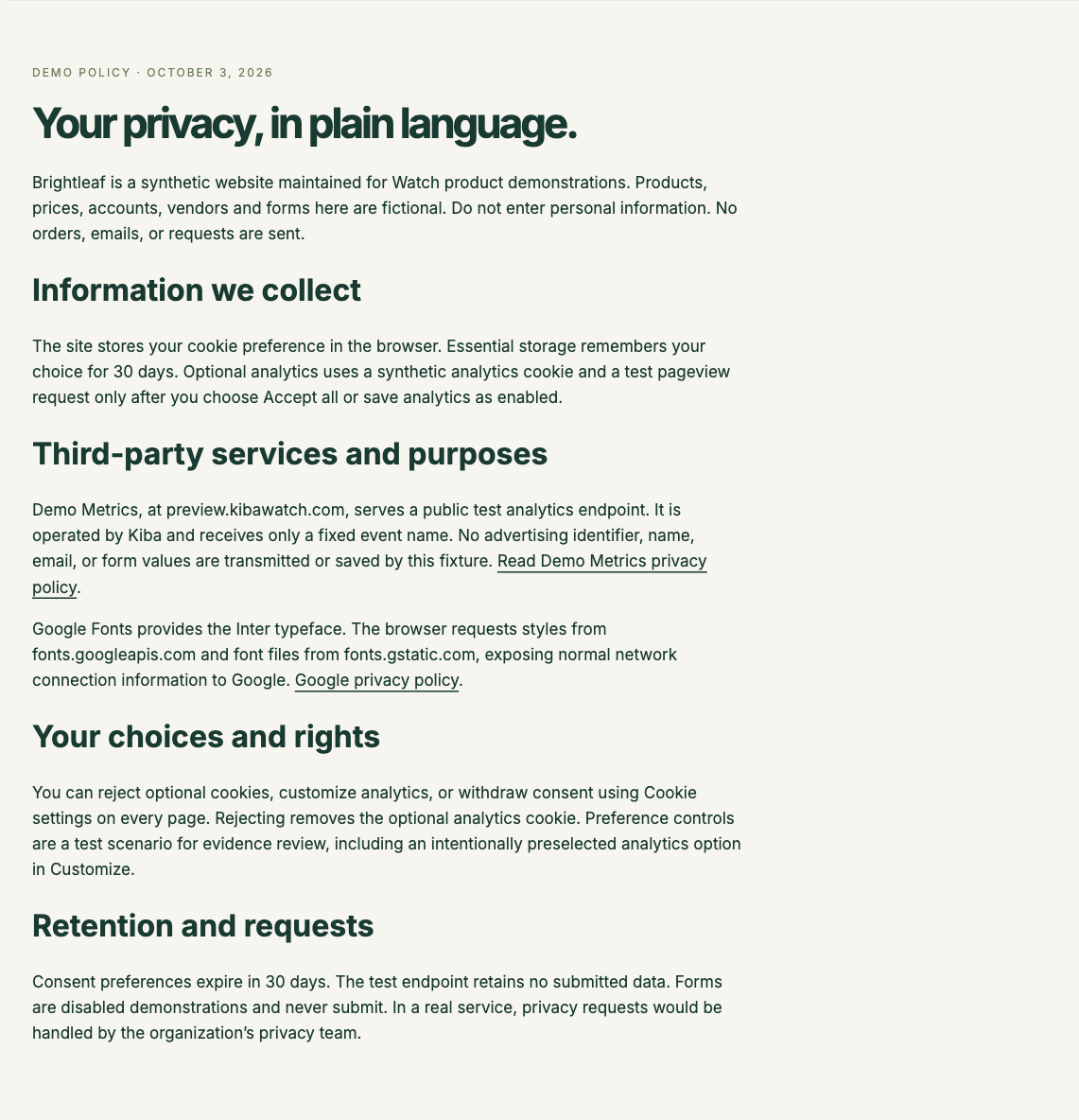
“Optional analytics uses a synthetic analytics cookie and a test pageview request only after you choose Accept all…”
Brightleaf privacy policy, Information we collect · captured October 28, 2026
The full policy also allows analytics when enabled through preferences. We tested fresh rejection, separate fresh acceptance, and a later withdrawal after acceptance. The observations cover one page and short windows, rather than every possible visitor journey.
See the captured policy and observation sources
Download the comparison observations and policy fingerprint (JSON)
Original fresh-choice observations (JSON) · Consent-testing guide and 34-second demo
Six claims, reviewed against the evidence
These are the Watch team’s editorial review notes for this synthetic example. They are not automated verdicts or legal advice.
The demo analytics cookie and request follow an enabled choice.
- Observed behavior
- The named demo endpoint had 0 / 0 / 0 observed requests before choice, after rejection and after reload. In the separate acceptance test, the same sequence was 0 / 1 / 1. The demo analytics cookie appeared only in the acceptance branch.
- Reviewer’s next step
- This supports the tested Accept all and Reject all paths in these short windows. The Customize → Save analytics path was not tested.
Rejecting later removes the optional demo analytics cookie.
- Observed behavior
- In a new test, we accepted, reopened Cookie settings, selected Reject all and reloaded. The demo analytics cookie changed from present to absent and stayed absent. The saved preference changed to rejected.
- Reviewer’s next step
- Keep the withdrawal sequence with its evidence. This checks the demo cookie and named request, not every possible identifier or server-side operation.
Google Fonts supplies the typeface through Google domains.
- Observed behavior
- Requests to fonts.googleapis.com and fonts.gstatic.com appeared on initial loads and reloads in the captured journeys.
- Reviewer’s next step
- The destination matches the stated service. Its purpose, configuration, data handling and legal treatment still need the site owner’s context.
The visible services section names Demo Metrics and Google Fonts.
- Observed behavior
- The reviewed policy text did not name Cloudflare performance measurement. The browser nevertheless loaded a Cloudflare beacon script and sent a request to /cdn-cgi/rum before a choice and after reload.
- Reviewer’s next step
- Ask the site owner which performance feature is enabled, what it sends and which notice covers it. Decide whether the policy or configuration needs changing. The request alone does not establish a legal violation.
Consent preferences expire after 30 days.
- Observed behavior
- We observed the preference cookie and local-storage key. A short capture does not establish how all saved preferences behave after 30 elapsed days.
- Reviewer’s next step
- Check cookie and local-storage lifetime separately, then test expiry behavior. A configured cookie expiry is different from proving deletion or expiry of every stored preference.
The demo endpoint retains no submitted data.
- Observed behavior
- A browser can show an attempted request. It cannot establish the endpoint’s stored records, infrastructure logs or retention process.
- Reviewer’s next step
- Review the endpoint implementation, logging and retention settings with its operator. Record that evidence separately from the browser capture.
A change of mind deserves its own test.
Fresh rejection starts without the optional demo cookie. To check the policy’s removal claim, we also needed an accepted state with that cookie already present.
| Moment | Saved choice | Demo cookie | Demo requests |
|---|---|---|---|
| After Accept all | accepted | Present | 1 |
| After later rejection | rejected | Absent | 0 |
| After reload | rejected | Absent | 0 |
Counts are attempted requests to the named synthetic analytics endpoint, not all network traffic. Google Fonts and Cloudflare performance requests remained on reload. Request observation does not establish what a server stores.
Capture conditions and limits
Chrome 156.0.8078.48, 1280 × 900 viewport, en-US, America/Denver timezone and no reported Global Privacy Control signal. Network location was not independently verified. Each post-interaction or reload window included a three-second observation. No request failures were observed in this withdrawal test.
Customize, other pages, geographic variants, signed-in journeys, long delays, 30-day retention and server-side processing remain outside these tests. The visible policy was captured separately from the browser journeys; this is not an atomic snapshot. Linked vendor policies and contracts were not reviewed.
FREE WORKING CHECKLIST · NO EMAIL OR ACCOUNT NEEDED
Run your own website privacy review.
Use these ten steps alongside your own evidence. A tick means you completed a review step; it does not mean the website passed a compliance check.
0 of 10 review steps done
List approved pages, visitor states and the question you are testing. Note browser version, viewport, locale, privacy signals, network location if known, and capture time.
Keep: Scope, authorization, environment and known limits
Keep the policy URL, capture date and relevant wording. List claims about choices, services, purposes and retention before looking for a match.
Keep: Policy snapshot or fingerprint and specific claims
Use a fresh test context. Record the banner, cookie names, relevant storage and network destinations before interaction. Keep queries, values and credentials out of shared copies.
Keep: Before-choice image and sanitized requests/storage
Record the exact controls and any Save step. Separate the requests before and after the interaction, using an explicit observation window appropriate to the page.
Keep: Choice sequence, timestamp and post-choice observations
Check that the choice remains and compare the same destinations and cookie names after reload in the same context.
Keep: Reload image, saved preference and request comparison
In a separate fresh context, repeat with Accept all. An endpoint absent in both branches may not have been triggered or may have been blocked.
Keep: Acceptance observations, failures and timing
After accepting, reopen preferences, reject optional purposes and reload. Check removal or persistence of relevant cookies and whether new optional requests occur.
Keep: Accepted, withdrawn and reload comparison
Map observed destinations to services, owners and business purposes. Keep unknowns explicit. Ask the website owner to confirm configuration and contractual roles.
Keep: Destination-to-service map with confirmed and unknown fields
For each policy claim, record the supporting or conflicting observation. Use Supported in this capture, Needs review, or Not tested. Identify server-side and long-term claims a browser cannot establish.
Keep: Claim-by-claim review with scope and uncertainty
Record a reviewer, rationale, owner, next action and recheck trigger or date. Keep the original evidence and relevant responses with the decision.
Keep: Decision, owner, follow-up and recheck plan
Ticks are a temporary aid and reset when this page reloads. Keep your review notes in your own copy of the CSV. Its status, reviewer note, next action, owner and recheck-date columns are yours to fill in.
Ask a question the evidence can answer
For the performance request in this example, the useful next question is which feature is enabled, what information it sends and how the organization describes that purpose. Keep the destination, timing and policy version with that question. Do not infer an advertising relationship, a legal violation or an entire data flow from a single request.
Keep the decision and the recheck together
A reviewer should record their interpretation, supporting source, unresolved questions, owner and next action. If the notice or configuration changes, repeat the relevant journey and retain the new observation alongside the original. The checklist supplies a repeatable working method; your organization remains responsible for the conclusion.
TRY IT ON YOUR WEBSITE
See what your website does.
Explore the saved sample report, then start a trial to scan your own website and review its summary. Use the free checklist to keep track of the questions you still need to answer.
The seven-day trial includes three basic scans and summaries. Detailed evidence and exports require a paid plan. Compare plans and scan allowances before choosing.
No payment collected for the trial. Create your workspace and get started at your own pace.
Continue your website privacy review
Explore a sample website privacy report · Use the free review checklist · Compare Watch pricing and trial limits